Which AI Assistant Is the Best? Our Top Choices by Category

If you’re looking for the single best AI assistant in the market, then you won’t find the answer in this post. It’s difficult to crown one AI assistant when these AI tools serve different purposes. But there are clear winners depending on what you actually need.
The growth of AI has paved the way for the creation of many AI tools. These tools range from simple chatbots that handle basic queries to more advanced AI agents that execute complex workflows. As this branch of technology continues to evolve, the variety and specialization of AI assistants have grown significantly, catering to diverse user needs and industries.
Understanding these different categories and capabilities of AI assistants can help you select the right tool or set of tools for your specific requirements. Whether you need assistance with writing and brainstorming or creating compelling visual content, there are a variety of options available.
The challenge is figuring out which AI assistant is best for your needs. In this guide, we’ll break down the top AI assistants across different categories so you can stop guessing and make AI work for you.
What is an AI assistant?
An AI assistant is software powered by large language models and natural language processing (NLP) that helps users complete a wide range of tasks. Depending on its category and capabilities, an AI assistant can generate content, answer questions, conduct research, analyze data, organize schedules, and automate workflows.
Some AI assistants integrate with multiple apps and business tools, allowing them to execute tasks across different platforms. This enables users to delegate complex, multi-step processes that would otherwise require significant manual effort.
AI assistants vary in their level of sophistication. Basic AI assistants function as conversational chatbots that respond to prompts and generate text. More advanced AI assistants can perform actions autonomously, such as scheduling appointments, sending emails, updating project management tools, or compiling reports with minimal user intervention. This range of reactive chatbots and proactive digital assistants makes AI a powerful tool for improving productivity and streamlining business operations.
How we evaluated the best AI assistants
The 20four7VA evaluation criteria included:
- Core intelligence: Reasoning quality, factual accuracy, and writing quality.
- Integrations: Support for Google Workspace, Microsoft 365, project management tools, CRM, and note-taking apps.
- Real-world tasks: Email drafting, report synthesis, calendar scheduling, basic analytics, and creative output.
- User experience (UX): Speed, reliability, and learning curve for non-technical business owners.
- Pricing and free tiers: Value proposition of each assistant, including availability of free plans, subscription costs, and scalability for teams.
Our rankings are independent and based on publicly available information. While our perspective is B2B, with a focus on what supports remote teams and small-to-mid-sized business owners.
Best AI assistant for general use: ChatGPT
ChatGPT, built on OpenAI’s GPT-5.x family, remains the best AI “default” personal assistant for most people due to versatility and ease of use. It handles writing tasks, brainstorming, summarization, and basic tasks with consistent writing quality.
-
Key features
- User-friendly, simple interface
- Strong performance in writing, rewriting, and summarizing emails, blog posts, SOPs, and social media posts.
- Coding help for small automations, scripts, and troubleshooting.
- Projects and Spaces organization for ongoing work (client folders, campaigns) with persistent memory across sessions.
- Support for text, images, and voice, with mobile and desktop availability.
-
Pricing
ChatGPT offers a free plan as well as a $20/month subscription (Plus). The free tier is suitable for light personal use with model fallback. Team and enterprise plans run ~$20–25/user/month with admin controls and collaboration features.
-
Business use cases
- Drafting and editing documents
- Brainstorming campaign ideas and email templates
- First-pass data inspection from CSV files
-
Limitations
ChatGPT does not offer direct inbox management or calendar control without third-party integrations. While it excels at generating content and brainstorming ideas, users should verify its outputs for accuracy and ensure they align with company policies, compliance requirements, and internal guidelines.
Hiring a virtual assistant (VA) to work alongside ChatGPT can help bridge these gaps. An AI administrative VA can review AI-generated content, manage your inbox and calendar, and oversee business processes that require human oversight and judgment. Additionally, they can verify information, enabling you to use ChatGPT more effectively while maintaining quality and accuracy.
Book a free consultation call with the 20four7VA team to find your AI-powered virtual assistant today!
Best AI assistant for research and analytics: Perplexity AI
When you need deep research with verifiable and credible citations, Perplexity AI is your best choice. As the top AI assistant under this category, it provides real-time research with cited sources, making it far more trustworthy than generic AI chatbots for competitive analysis and market intelligence.
-
Key research features
- Live web search with inline citations and source links-Perplexity AI provides source-backed answers for accurate research.
- Multiple modes including quick AI search and “Pro Search” deep dives for complex queries.
- Document uploads that combine internal files with web research for richer context.
- Shared workspaces for ongoing research topics or clients.
-
Review
Perplexity Pro received a 4.5/5 rating on G2, with the reviewer describing it as a tool that “works more like a research assistant than a traditional search engine.” Users praise its intuitive interface and straightforward onboarding, making it easy to get started with minimal learning curve. Another highlighted feature is its use of clickable citations for most responses, allowing users to quickly verify information and explore the sources.
-
Pricing
Perplexity AI offers a free plan and a $20/month Pro subscription. The free tier includes basic searches and capped Pro Searches per day (around 5), good for occasional research. The paid plan unlocks advanced models, higher limits, and features like Model Council for multi-model evaluation.
-
Limitations
Perplexity’s focus is on research. It cannot manage inboxes and calendars by itself. It must be paired with note-taking tools like Notion AI and human interpretation for strategic decisions.
A 20four7VA research VA can help navigate Perplexity AI for excellent research that churns out valuable insights. Schedule a free consultation with our team to get started!
Best AI assistant synced with the Google Ecosystem: Google Gemini
With over 3 billion active monthly users, Google Workspace is a common fixture in many remote teams. Google Workspace users who run their operations in Gmail, Google Docs, Sheets, Slides, Drive, and Google Calendar will find that Google Gemini is the most seamless AI assistant they can integrate with their current workflow.
For Google Workspace users running their operations in Gmail, Google Docs, Sheets, Slides, Drive, and Google Calendar, Google Gemini is the most seamless AI personal assistant due to tight integration and security controls. Google Gemini integrates directly with Google Workspace applications, meaning your AI assistant lives where your work already happens.
-
Core features with Google Workspace integration
- Context-aware help inside Gmail that can summarize long email threads, draft replies, and handle follow-ups.
- Google Docs support for outlining, rewriting, and deep research that compiles multi-page reports.
- Sheets formulas and basic analysis, Slides presentation drafting, and Drive file summaries.
- Google Calendar assistance for scheduling meetings, meeting notes prep, and follow-up generation.
- Google search and YouTube integration for faster information retrieval-this is Google AI woven directly into your daily workflow.
Google Gemini integrates directly with Google Workspace tools through custom “Gemini Gems,” allowing users to create role-specific mini-assistants (e.g., “Marketing Brief Writer” or “Recruiting Screener”) that Google Workspace users can deploy across their teams.
-
Pricing
Free access for consumers with a lightweight model in Google Search. Google Gemini Advanced costs $19.99/month with Google Workspace integration. Workspace AI add-on tiers (AI Pro/Ultra) are available per user for organizations already standardized on Google Apps.
-
Limitations
Gemini’s features become less compelling if your core stack is Microsoft ecosystem tools. Mobile users reported that some AI features lag compared to when on desktop. Additionally, while agentic capabilities are emerging, humans remain essential for approvals and edge cases.
Best AI assistant for calendar and time management: Reclaim AI
Reclaim AI is the best AI assistant focused on calendar and time management for busy professionals working with Google Calendar or Outlook and need help protecting focus time, scheduling habits, and reducing cognitive load from constant context-switching.
-
Core scheduling features
In Reclaim’s 2026 report, users reported “ an increase of 7.6 productive hours per week and a 49% reduction in time waste.” These improvements can be attributed to the following features:
-
- Automatic blocking of focus time around deadlines and priorities.
- Smart scheduling of habits (daily planning, content writing, prospecting) that dynamically move as meetings change.
- AI-driven conflict resolution that reschedules routine tasks rather than simply dropping them.
- Integration with task managers (Asana, Jira, Todoist) to convert tasks into scheduled time blocks via cross-app automation.
-
Pricing
Free tier with limits on habits, tasks, and calendars-ideal for individuals testing the product. Paid plans start around $8–12/user/month, unlocking more habits, scheduling links, and team features.
-
Optimizing Reclaim
A 20four7VA calendar management virtual assistant can use Reclaim to maintain an executive’s calendar, ensure weekly planning rituals happen, and coordinate between personal and business commitments. Combining Reclaim AI with a human personal assistant leads to fewer dropped tasks and more predictable days.
-
Limitations
Reclaim AI is designed specifically for calendar optimization rather than as a general-purpose AI assistant. It does not generate content, conduct research, or automate complex business workflows like ChatGPT, Claude, or Gemini. Businesses looking for a wider range of AI capabilities may need to combine it with other AI tools. Like with any automated scheduling system, it’s best to regularly check Reclaim’s suggestions from time to time to make sure they fit your work style and business goals.
Hire a 20four7VA virtual assistant today. Book a free consultation call with our Sales Executives to find the right VA.
Honorable mention: Best AI tools for creative and design work
While most AI assistants are text-based, creatives and marketing teams increasingly rely on AI-powered design tools for images, video, and brand assets. Here are the leading options for creative tasks:
- Canva AI is integrated into Canva’s design editor with automatic layouts, Magic Media for AI generation of images and video, and copy suggestions. Ideal for social graphics, presentations, and quick marketing assets. Canva offers a free tier with paid subscriptions starting at $10/month per user.
- Adobe Firefly (inside Creative Cloud) offers text-to-image, generative fill, and style transfer tightly integrated into Photoshop, Illustrator, and Express. This option is best for professional designers needing high-quality, on-brand outputs with commercially safe licensing. Pricing starts at ~$9.99/month for standalone Firefly, while the full Creative Cloud plans run $20–60/month per seat.
However, here’s a clear caution: AI-generated visuals need brand consistency guardrails. Users must always review adherence to internal guidelines and confirm commercial usage rights with each provider’s license terms before publishing.
A graphic design VA can help you make the most out of these creative AI tools while ensuring compliance and maintaining your brand voice. Schedule a free consultation session with the 20four7VA team today.
Choose the best stack for your business
No single best AI assistant covers every scenario. AI assistants should integrate with existing tools for effective task management. Instead of a full overhaul, think in terms of adopting a small stack optimized for your main bottlenecks.
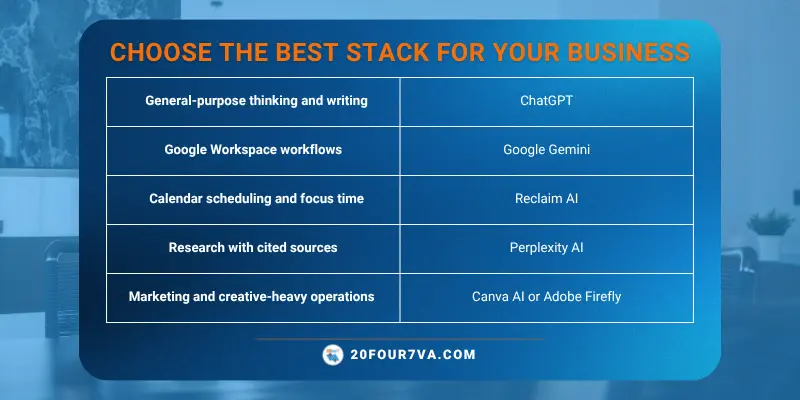
Once tools are selected, you can hire a 20four7VA virtual assistant to navigate these tools and work across them to improve your operations. They can maintain documentation, create SOPs, and ensure compliance with data security best practices.
Frequently-asked questions (FAQs)
Is there a single “best” AI assistant for both personal and business use? |
While ChatGPT is the strongest all-rounder for most casual users, there is no one single AI tool that trumps all. Instead, you can create a stack based on your ecosystem (Google vs. Microsoft), your main tasks (research vs. scheduling vs. creative), and budget. |
Can AI assistants fully replace a human virtual assistant? |
AI assistants cannot fully replace human VAs for serious businesses. AI drafts and analyzes; human VAs provide oversight. At the end of the day, people remain responsible for the decisions made using AI-generated outputs and the outcomes that follow. They decide, coordinate, and execute in unpredictable real-world scenarios-handling relationship management, exception handling, and multi-system complexity. The realistic division of labor is AI for speed and volume and humans for judgment and execution on everything else. |
How do I make sure AI assistants don’t compromise my data security? |
Choose vendors with clear security documentation, data residency options, and the ability to opt out of training on your data. Whenever handling customer or financial data, use business accounts rather than personal accounts. Business or enterprise accounts typically offer stronger security, administrative controls, and compliance features. Just as important are the internal policies you establish in your company. Clearly identify what employees can and cannot share with AI tools and require reviewing outputs before using them in business-critical workflows. |